All.synchronize gh issue labels.how to guide
Synchronize GH issue labels#
Overview#
-
GitHub labels help categorize and prioritize issues in a repository. You can find more information in the
all.use_github.how_to_guide.md -
The
/dev_scripts_helpers/github/sync_gh_issue_labels.pyscript synchronizes GitHub issue labels between a repository and a label inventory manifest file -
The script includes options to back up existing labels before synchronization to prevent data loss
-
The labels are stored in the
/dev_scripts_helpers/github/labels/gh_issues_labels.ymlfile, which acts as a manifest for synchronization. You can create your own label file or use the default ones provided in the repository but you need to use only YAML file
Prerequisites#
Label file#
-
A GitHub label includes the following attributes:
name: The label's namecolor: The label's color in hex format (e.g.,#FF0000for red)description: A short description of the label
-
The
dev_scripts_helpers/labels/gh_issues_labels.ymlfile contains various label types, as shown below:
# Priority Labels.
- name: P0
    description: High priority - needs immediate attention
    color: "#ff0000"
# Issue Types.
- name: Blocking
    description: This issue needs to be worked on immediately
    color: "#e11d21"
# Pull Request Guidelines.
- name: PR for authors
    description: The PR needs changes
    color: "#eb35f3"
# Issue Status.
- name: Paused
    description: An issue was started and then stopped
    color: "#cccccc"
# Contribution Types.
- name: Good first issue
    description: Simple tasks for newcomers
    color: "#7057ff"
Permissions and access#
-
The script uses the
PyGithublibrary to interact with the GitHub API. Ensure you have it installed in your Python environment -
Ensure that your local Python environment contains a token with write access to the repository for the script to function. To check whether you have the token in the local environment, run the following command:
> echo $GITHUB_TOKEN
- The script requires write access to the repository you want to update labels
How to synchronize issue labels#
Using GitHub#
-
Open the
Issuessection in the GitHub repository you want to update labels in
-
Click on
Labelson the right side of the page to view all the labels in the repository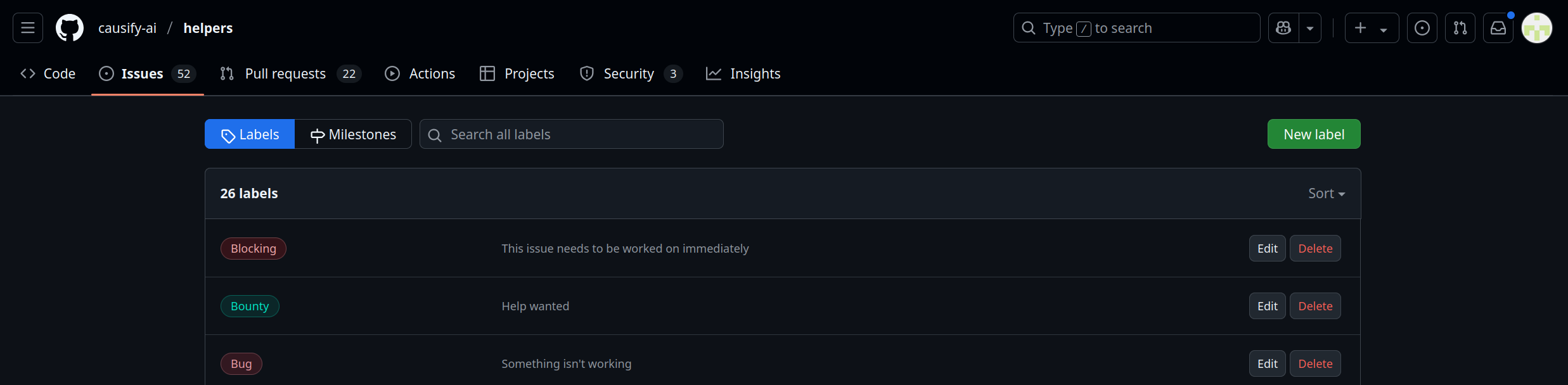
-
To edit or delete a label, click on the label and make the necessary changes
-
To create a new label, click on
New Label, enter its name, description, and color, and clickCreate Label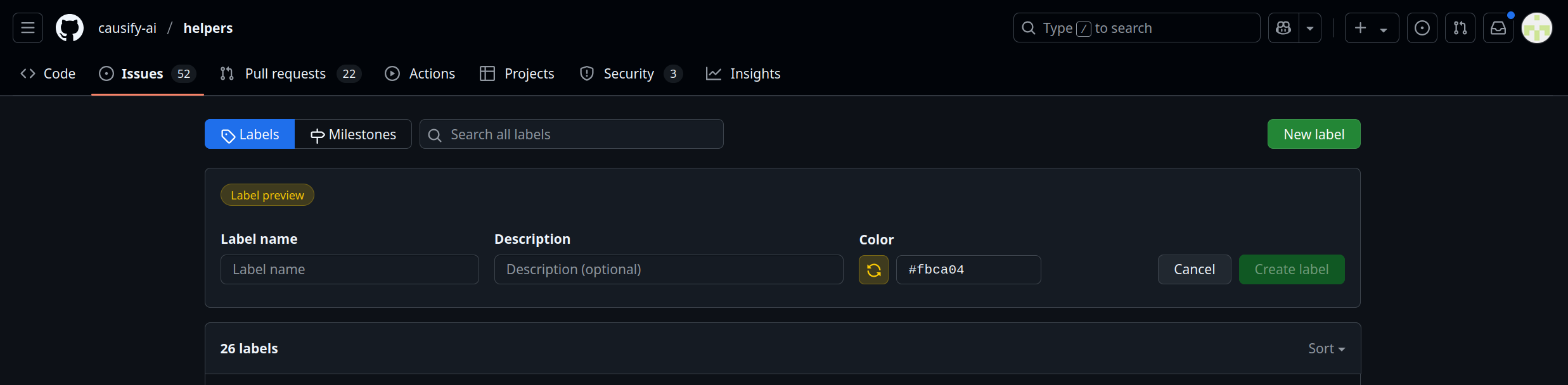
Running the script manually#
-
When you want to create, update, or delete a label, update the
dev_scripts_helpers/labels/gh_issues_labels.ymlfile accordingly. If working with a different file, ensure to specify the correct path in the script -
Run the script to synchronize the labels in the GitHub repository using the following command:
> ./dev_scripts_helpers/github/sync_gh_issue_labels.py \
        --input_file ./dev_scripts_helpers/github/labels/gh_issues_labels.yml \
        --owner causify-ai \
        --repo helpers \
        --token_env_var GITHUB_TOKEN \
        --backup \
        --dry_run
12:26:27 - INFO  hdbg.py init_logger:1013                               Saving log to file '/home/peeyush/src/helpers1/dev_scripts_helpers/github/sync_gh_issue_labels.py.log'
12:26:27 - INFO  hdbg.py init_logger:1018                               > cmd='./dev_scripts_helpers/github/sync_gh_issue_labels.py --input_file ./dev_scripts_helpers/github/labels/gh_issues_labels.yml --owner causify-ai --repo helpers --token_env_var GITHUB_TOKEN --backup --dry_run'
12:26:28 - INFO  sync_gh_issue_labels.py _main:205                      Labels backed up to /home/peeyush/src/helpers1/tmp.labels.causify-ai.helpers.yaml
Are you sure you want to synchronize labels? [y/n] y
12:26:32 - INFO  sync_gh_issue_labels.py _main:263                      Label 'P0' not changed
12:26:32 - INFO  sync_gh_issue_labels.py _main:263                      Label 'P1' not changed
...
12:26:32 - INFO  sync_gh_issue_labels.py _main:263                      Label 'Readings' not changed
12:26:32 - INFO  sync_gh_issue_labels.py _main:241                      Label 'Testing' will be created without --dry_run
12:26:32 - INFO  sync_gh_issue_labels.py _main:263                      Label 'PR for authors' not changed
...
12:26:32 - INFO  sync_gh_issue_labels.py _main:263                      Label 'Bounty' not changed
12:26:32 - INFO  sync_gh_issue_labels.py _main:264                      Label synchronization completed!
- For more information on the script's arguments, run the following command:
> ./dev_scripts_helpers/github/sync_gh_issue_labels.py --help
Using Invoke#
TODO(*): Update this section once the invoke target is implemented
- You can run the script using the
invokecommand where$FILENAMEis the name of the YAML file containing the labels:
> i sync_gh_issue_labels \
        --input_file $FILENAME \
        --owner causify-ai \
        --repo sports_analytics \
        --token_env_var GITHUB_TOKEN  \
        --backup